The Konak Tel Çit App: From Parcel to Material List
How our mobile app takes you from a plot's cadastral boundary to fence length, material list and quote, and exactly what it calculates along the way.
The slowest part of a fencing job happens before a single post goes in the ground: the take-off. How many metres is the boundary, how many panels, how many posts, how much concrete? On site these questions are usually answered with a tape measure, a notepad and a fair amount of guesswork. The Konak Tel Çit app moves that work onto your phone: you select your parcel and the measurements and material list come out on their own.
Select your parcel, let the measurements come to you
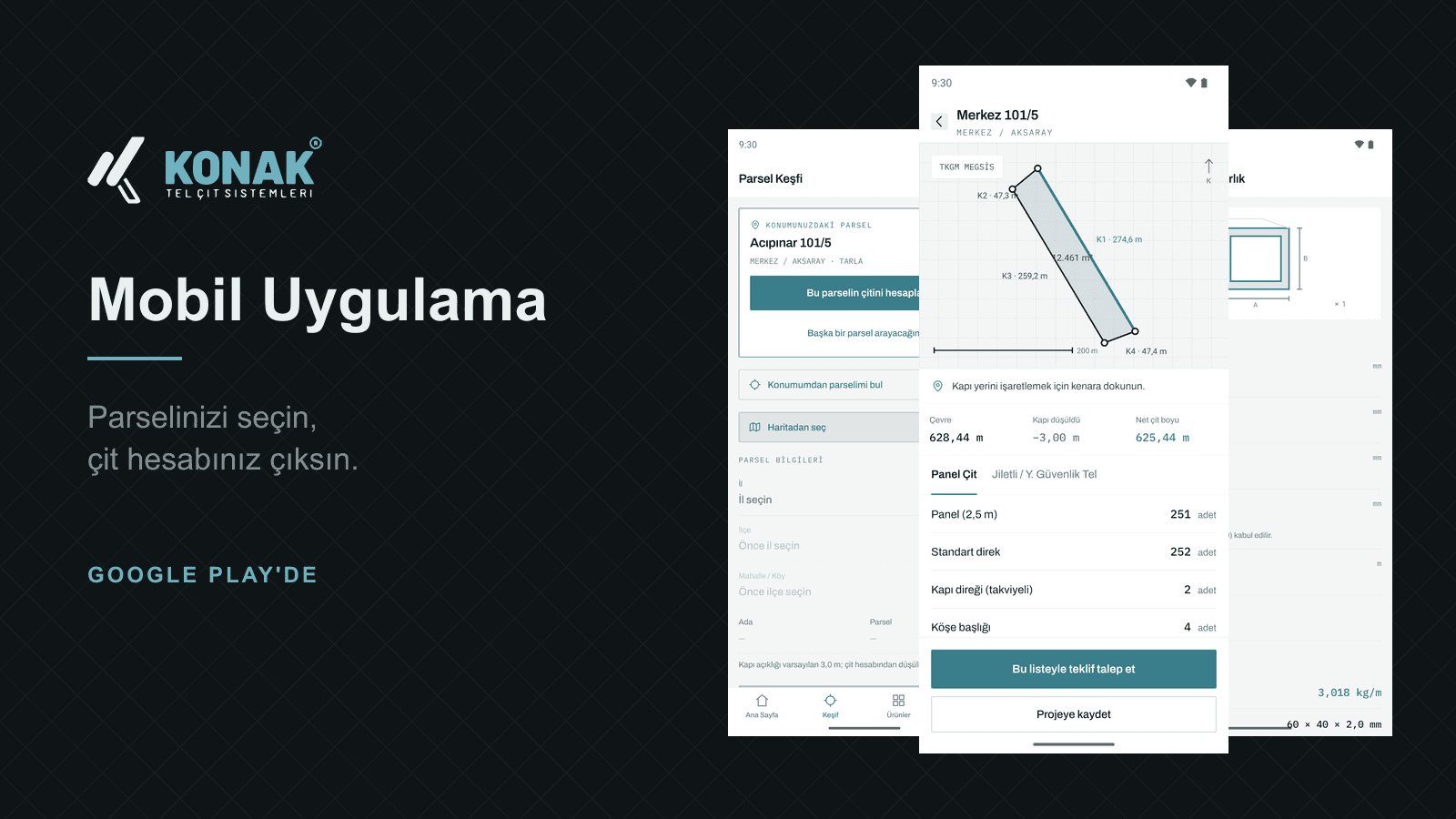
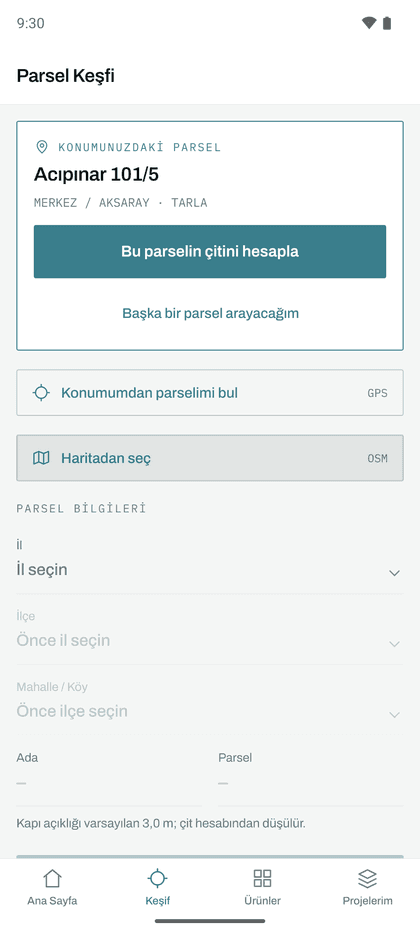
Cadastral data sits at the centre of the app. Enter province, district, neighbourhood plus block and parcel number and your plot's real cadastral boundary is drawn on the map. Perimeter, area and corner count are calculated automatically, so no tape measure is needed.
Don't know your parcel number? Grant location permission and the app finds the parcel you are standing on. If you are not exactly on the plot, at the roadside or on the neighbouring field, it shows the nearest parcel and states how far away you are, so you never work on the wrong plot by accident.
There is a third way: open the map and tap. Your position is shown live; touch anywhere on the plot and the parcel at that point is fetched. You can do this from the office, from home, from another city.
The material list, item by item
As soon as the boundary is known, the take-off is ready. For panel fence and razor-wire lines the app lists how many panels, standard posts, reinforced posts, corner caps, clips and bags of ready-mix concrete are needed. These are not rough guesses; every line is derived from real installation rules such as panel module width and post spacing.
Gates are accounted for too. Tap the edge where the gate will go; the gate opening is deducted from the total fence length and the compass direction the gate faces is written into the quote, so the installation crew knows where it belongs before they arrive.
Site analysis a fencing contractor can actually use
Below the material list you get the same figures a contractor would produce during a site survey:
- Area: in square metres and in dönüm, the unit landowners actually speak in.
- Bounding size: the rectangle enclosing the plot; used when planning haulage and tensioning runs.
- Shape and regularity: how close the plot is to a rectangle, as a percentage. Irregular ground wastes more material, so the app suggests 5% or 7% wastage accordingly.
- Corner breakdown: how many right/obtuse corners, how many reflex, how many acute. This drives clamp and corner-component selection.
- Frontage: the length and compass bearing of the longest edge, highlighted on the map as well.
Under that comes the edge list: every boundary edge from K1 onwards with its length, its bearing and how many panels it takes. Crews build fences run by run, and the list comes out in exactly that order. If an edge is shorter than one panel the app flags it, so you know a cut panel is coming before you order.
Twelve engineering calculators, offline
Independently of the parcel workflow, the calculations most often needed on site are built in:
- Post and clamp take-off, post spacing and foundation concrete
- Square and round hollow section weight (including corner radius)
- Chain-link and 2D/3D panel fence weight per square metre
- Barbed and razor wire coil calculations
- Gate material take-off and motor class
- Galvanised wire weight and coating life by atmospheric class
- AWG to millimetre converter
Each calculator carries a technical drawing of the product above the fields. Touch a dimension and that dimension lights up in the drawing: enter wall thickness and the profile wall is highlighted; enter mesh aperture and the dimension arrow turns to the accent colour. You can see which measurement you are entering, which removes the classic wrong-field mistake.
All of this runs on the device itself, so the numbers are still correct when there is no signal on site.
Send the quote from there
Turn the resulting list into a quote request with one tap. Nothing has to be re-entered: parcel details, net fence length, gate orientation and the material breakdown reach our sales team exactly as you saw them. You can attach photos of the site if you wish.
No sign-up required. There are no accounts, no passwords, no e-mail verification. Your name and phone number are enough, and our team calls you back on that number.
Your projects stay on your phone
Saved surveys are stored on your device and open without an internet connection, with boundary, measurements, gate position and material list included. You never have to query the same plot twice. These records are not sent to our servers; they live on your phone and are removed when you uninstall the app.
Product catalogue and nearest dealer
Panel fence, chain-link, razor wire, gabion, gates and post systems are all in the catalogue with technical specifications, dimension tables, colour options and certificates. Once opened, a product stays available offline. You can also see your nearest sales point and call it or get directions with a single tap.
Privacy: what is collected and what is not
The app shows no advertising, contains no analytics trackers and does not ask you to create an account. Location permission is optional; when granted, your coordinate is used momentarily for the parcel query and is not written to our database. Camera and gallery access is requested only when you choose to attach a photo to a quote. The full details are set out item by item in the app's privacy policy.
Why no prices?
The app produces a material list but no prices. The reason is simple: fence cost depends not only on the run length but on ground conditions, height, colour and shipping distance. A fixed list price would mislead on most projects, so we prepare a project-specific quote for every request.
Mobile app
Get the Konak Tel Çit app
Pick your parcel; fence length, material list and quote on your phone. Free for Android.

Free · No ads · No sign-up
 Finds the parcel you are standing on
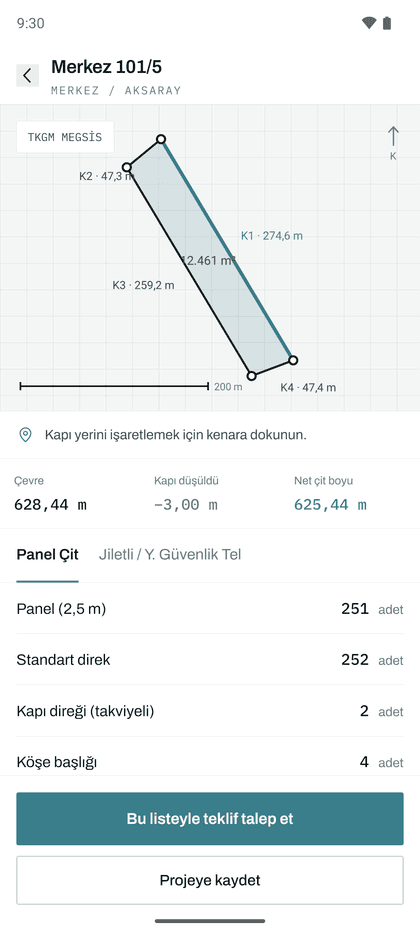 Cadastral boundary, edge lengths and gate position
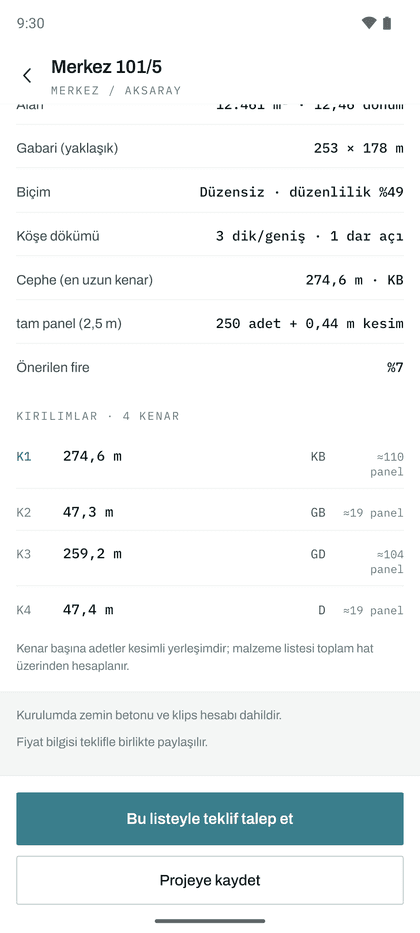 Site analysis and edge-by-edge breakdown
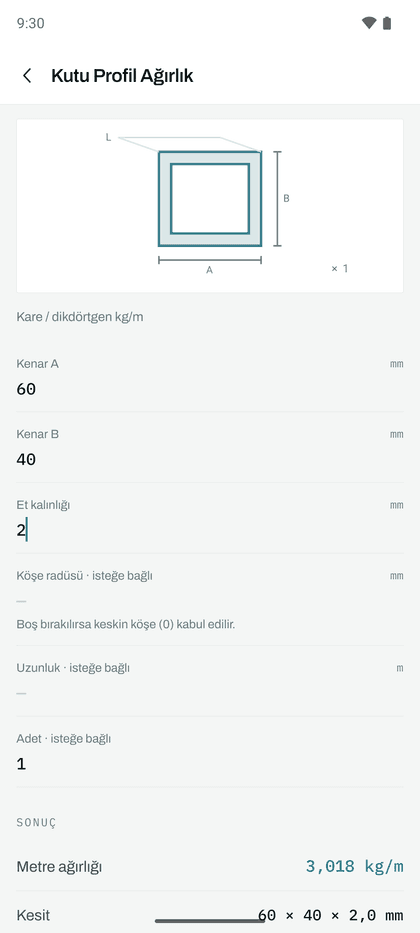 12 calculators, works offline
Currently Türkiye only
The app's parcel features are powered by the cadastral records of the Turkish Land Registry and Cadastre (TKGM), so parcel lookup by number or by location works only within Türkiye. For projects abroad you can enter the measurements manually and still get a material list, or contact us directly.